Image Search Techniques: 10 Smart Ways to Find Any Photo

Image search techniques have completely changed the way people actually find pictures online. I still remember typing random word combinations into Google Images, trying to find a photo I’d seen once on a friend’s phone. It never worked. These days you’d just upload the picture and be done in five seconds. That’s the real shift here — search stopped being about guessing the right words and started being about the image itself.
Google Images, Google Lens, Bing Visual Search, Pinterest, TinEye — put them together and you’re looking at billions of visual searches happening every single day. Most people still use maybe one of these tools, and usually not in the smartest way possible. Which is a shame, honestly, because the difference between a decent search and a great one often comes down to picking the right method for the job.
Say you want to know if a photo is fake, or you’re trying to find the exact jacket your coworker was wearing, or you just need design inspiration that matches a certain vibe — none of those are the same problem, so none of them should use the same search approach. Upload a photo. Scan something with your camera. Search by color. Let an AI model pick apart what it’s looking at. Bloggers, marketers, students, journalists, people just trying to shop online — all of them are already using pieces of these image search techniques whether they realize it or not.
This guide breaks down how visual search actually works, walks through the image search techniques that are genuinely worth learning, compares what’s out there in 2026, and hands you tips you can put to use right away. Doesn’t matter if you’re brand new to this or you’ve been doing it for years — there’s usually something here worth picking up.
What Are Image Search Techniques?
Put simply, these are the different ways you can find, identify, compare, or verify a picture using search engines and AI. The old way was matching words to a caption. The new way actually looks at what’s in the photo — colors, shapes, textures, objects, faces, whatever metadata is attached — and that’s a big part of why results feel so much more useful now.
Google, Bing, Pinterest — none of them are just matching filenames anymore. They’re trying to figure out what’s actually happening in the picture. And that’s exactly why you can now hand a search engine a photo, a screenshot, or point your camera at something instead of typing out a description.
Common Image Search Methods
Keyword-based image search Reverse image search Visual similarity search Google Lens camera search Object recognition Facial recognition Color and pattern search Metadata-based search Context-aware image search Multi-engine image search
None of these do the same job. Reverse image search traces a photo back to where it came from. Visual similarity search hunts down images that share a look. Object recognition figures out what a product, animal, or landmark actually is from one photo. Knowing which one fits your situation saves a lot of wasted scrolling.
Why Image Search Matters Today
There’s just so much visual content floating around now. Websites, social platforms, online stores — images pile up fast, and being able to actually find the one you need has stopped being optional.
Faster Information Discovery with Image Search
Upload a picture, get an answer back almost instantly. No fumbling for the right words.
Better Online Shopping Through Visual Search
A lot of eCommerce sites now let you upload a photo and get matching or near-matching products from several retailers at once. You don’t even need to know what the thing is called.
Improved Fact Checking with Reverse Image Search
Reporters, researchers, students — reverse image search is basically a default tool now for figuring out if a photo is genuine or has just been recycled from somewhere else. It’s not a perfect fix for misinformation, but it helps.
Stronger Brand Protection via Image Search Tools
Companies use these tools to find out where their images are turning up online, which makes it a lot easier to catch someone using a product photo without permission.
Enhanced Creativity with Visual Similarity Search
Designers and photographers lean on similarity search for inspiration and to keep a project looking consistent.
AI just keeps getting better at all of this, so knowing how to search visually is turning into one of those skills you kind of need now, not a nice extra.
How Do Image Search Techniques Work?
At a high level, modern image search mixes AI with computer vision so the engine actually understands what’s in a picture instead of treating it as a pile of pixels. Every platform does it a little differently, but the basic shape is usually the same.
Image Analysis
The system starts by breaking the picture down:
Colors Shapes Edges Textures Objects Patterns
That combination ends up working like a fingerprint — unique enough to the image that the system can use it for comparison later.
AI-Powered Recognition
Deep learning models take over from here, figuring out what’s actually in the frame — a mountain, a red sports car, a leather bag, a cat, a landmark you’d recognize. It’s not matching tags anymore. It’s actually reading the picture.
Database Matching
Then it’s compared against billions of other images already indexed, checking visual appearance, metadata, context, how objects sit next to each other, color composition.
Displaying the Best Results
And finally you get your results — exact matches, similar-looking photos, shopping listings, the websites hosting the image, maybe some educational content depending on what you searched.
This whole layered approach is why current image search feels so much quicker and sharper than the old keyword-only days.
How AI Improves Visual Recognition
AI basically rewired how engines read pictures. It’s not just filenames and captions anymore — it can pick up on objects, how those objects relate to each other, background details, facial expressions, logos, product categories, text sitting inside the image, the whole context of the shot.
Upload a photo of a blue running shoe and AI can spot the product, guess the brand, find similar models, and point you to stores selling it — pretty much instantly. That kind of understanding is why visual search keeps improving year after year, and honestly it doesn’t seem to be slowing down.
Types of Image Search Techniques
Different situations call for different tools:
Keyword-Based Image Search Reverse Image Search Visual Similarity Search Google Lens Search Color & Pattern Search Object Recognition Facial Recognition Metadata Search Context-Based Search Multi-Engine Image Search
Let’s go through each one.
Keyword-Based Image Search
Old-school, but it still works. No uploading required, just type descriptive words.
“Modern home office workspace” beats “office” every time, because the extra detail gives the engine something real to work with.
How Keyword-Based Image Search Works
Engines scan file names, alt text, captions, page content, metadata, then rank whatever’s closest to what you typed.
Best Uses for Keyword Image Search
Blog images, educational graphics, news photos, stock photography, infographics, wallpapers, icons.
Pro Tips for Better Image Search
Skip the one-word searches. Add colors, styles, locations if you can. Use filters for size or usage rights. Quotation marks when you need an exact phrase.
Works great when you already know roughly what you’re after. But if all you’ve got is a picture and no good way to describe it, you want reverse image search instead.
Reverse Image Search
Probably the most genuinely useful tool on this whole list. You upload the photo — or drop in its URL — and the engine goes hunting for matches or close cousins of it across the web.
Great for when you don’t know what something’s called, want to check if a photo’s actually real, or need to figure out where it first showed up.
How Reverse Image Search Works
Upload the image and the engine compares its visual features against billions of others, then hands back exact matches, similar images, higher-quality versions, the sites using it, and sometimes the original source too.
Common Uses for Reverse Image Search
Spotting fake or misleading photos. Tracking down who actually made an image. Catching stolen or copyrighted content. Finding a bigger, cleaner version of a low-res photo. Identifying products. General fact-checking.
Practical Example of Reverse Image Search
You see a great living room design on social media and have no clue where it’s from. Drop it into Google Images or TinEye and there’s a decent shot you’ll find the original post, similar layouts, or even the furniture stores selling those exact pieces.
Visual Similarity Search
This one skips exact matches entirely and goes after images with a similar feel — same color scheme, similar layout, that kind of thing. All AI and computer vision under the hood, no filenames involved.
How Visual Similarity Search Works
The engine looks at colors, shapes, objects, textures, backgrounds, overall design, then compares all of that against millions of other pictures.
Best Uses for Visual Similarity Search
Interior design ideas, fashion research, graphic design, product discovery, website inspiration, planning out social content.
Example of Visual Similarity Search
Upload a photo of a nice office setup and instead of just that one image, you get dozens of other spaces with a comparable look — similar furniture, similar lighting, similar vibe overall.
Pro Tip for Visual Similarity Search
Pinterest Lens and Google Lens are both really solid for this, especially fashion, décor, lifestyle stuff.
Google Lens: Camera-Based Image Search
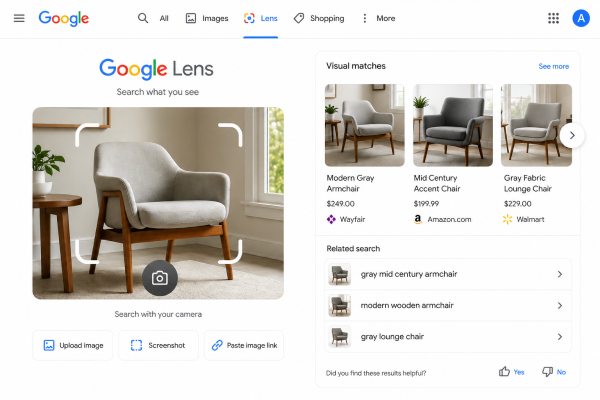
This is probably the flashiest tool on the list. No uploading anything — just point your camera and it tells you what it’s looking at, right then.
What Google Lens Image Search Can Identify
Plants, animals, products, books, clothing, landmarks, food, QR codes, and text sitting inside images.
Real-Life Example of Google Lens Search
You’re traveling somewhere new and spot a building that looks important but you have no idea what it is. Point Lens at it and within seconds you’ve got the name, some history, its location, reviews.
Why People Love Google Lens for Image Search
It’s fast. Makes shopping comparisons painless. Translates text right there on the spot. Helps with homework in a pinch. Makes traveling a little less confusing. That combo of speed and everyday usefulness is basically why it caught on so fast.
Color and Pattern Search for Images

Sometimes you’re not after a specific thing at all — you just want images that fit a certain color scheme or design vibe. That’s this technique’s whole job: sorting by dominant colors and recurring patterns.
Common Uses for Color-Based Image Search
Graphic designers, brand managers, interior decorators, website designers, social media marketers.
Example of Color and Pattern Image Search
A company building a blue-themed site might search “blue business backgrounds” to keep everything visually consistent.
Benefits of Color-Based Image Search
Consistent branding. Faster design research. Better visual harmony. Easier inspiration hunting.
Object Recognition Search Technique
This one zooms in on specific items inside a picture instead of the whole scene — furniture, electronics, shoes, cars, watches, household stuff, animals.
Practical Example of Object Recognition Search
You spot a nice chair in a hotel lobby, snap it with Google Lens, and it pulls up similar products, where to buy them, reviews, prices. Suddenly a passing glance turns into an actual purchase decision.
Facial Recognition Image Search
Another AI-powered technique, but this one’s about faces, not objects — comparing facial features against other indexed images.
Common Applications of Facial Recognition Search
Identity verification, journalism, organizing old photos, tagging people on social media, security systems.
Important Note on Facial Recognition Image Search
This needs to be handled carefully and legally. Privacy matters just as much as the tech itself.
Metadata-Based Image Search
Every digital photo carries hidden info tucked inside it — file name, camera model, when it was taken, GPS location, alt text, description, copyright details. Search engines use this to make sense of images.
Why Metadata Matters for Image Search
Good metadata helps with image SEO, makes images easier to find, helps verify they’re authentic, keeps large photo libraries organized. For anyone running a website, descriptive filenames and real alt text are still just basic good practice.
Context-Based Image Search
Engines don’t stop at the image — they look at what’s around it too. Nearby text, the page title, heading tags, what kind of site it’s on, what the person searching probably wants.
Example of Context-Based Image Search
The exact same laptop photo could show up as part of a product review on a tech blog, or as a shopping listing somewhere else entirely. Reading that context is what makes the results actually useful.
Advanced Image Search Operators
A few tricks for narrowing things down:
site: pulls images from one specific website filetype: finds PNG, JPG, or SVG files only ” ” searches an exact phrase -keyword cuts out unwanted results OR searches across a few related terms at once
Example: modern office site:unsplash.com pulls office photos from Unsplash and nowhere else.
Useful stuff if you’re a researcher, marketer, or blogger who needs more control over what shows up.
Multi-Engine Image Search
No single search engine has everything indexed, so anyone doing this seriously ends up bouncing between platforms — Google Images, Google Lens, Bing Visual Search, TinEye, Pinterest Lens, Yandex Images.
Checking a few engines instead of one bumps up your odds of finding the original source, a better-quality version, similar images, duplicates, or copyright info you’d otherwise miss entirely.
Best Image Search Tools Comparison
| Tool | Best For | Main Advantage |
| Google Images | Everyday searches | Largest image database |
| Google Lens | Camera-based search | AI object recognition |
| TinEye | Reverse image search | Finds exact duplicates |
| Bing Visual Search | Product discovery | Strong object detection |
| Pinterest Lens | Design inspiration | Excellent visual similarity |
| Yandex Images | Facial recognition | Accurate people matching |
| Shutterstock | Licensed images | Copyright-safe visuals |
Real-World Applications of Image Search Techniques
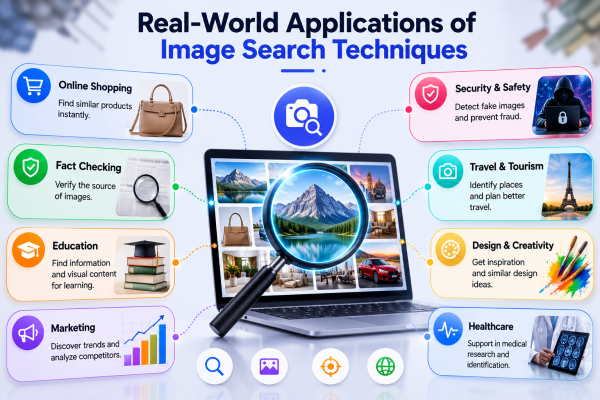
eCommerce and Image Search
Shoppers upload a photo, retailers show them the same or similar item instantly.
Digital Marketing Uses for Image Search
Marketers keep tabs on brand images, spot trends, watch what competitors are doing.
Journalism and Reverse Image Search
Reporters check whether a viral photo is actually real before running with it.
Education Uses for Image Search Techniques
Students figure out what plant, place, or diagram they’re looking at.
Graphic Design and Visual Search
Designers pull inspiration while staying consistent with their visual style.
Travel and Google Lens Image Search
Travelers point Google Lens at landmarks, restaurants, monuments, whatever’s nearby.
Healthcare Applications of Image Search
Some medical professionals use AI-based visual recognition to support their analysis — never as a replacement for actual expert judgment, just a supporting tool.
Future of Image Search Techniques
AI keeps pushing this forward. Search engines aren’t just matching objects anymore — they’re starting to read context, intent, even the emotional tone of a photo.
Over the next few years, expect this to get noticeably sharper, with a lot less effort required on your end.
AI-Powered Image Search Understanding
Future systems will pick up on things like human activity, emotional expression, how objects relate to each other, complex scenes, environmental context – all of which should make results feel a lot more personal.
Smarter Multimodal Image Search
This blends text, images, voice, and video into one search. Upload a photo of a backpack, type “show me this in black under $100,” and the AI reads both the picture and your request together.
Augmented Reality Integration in Image Search
AR is expected to pair up with visual search. Point your phone at something and get product info, reviews, shopping links, tutorials – shopping and traveling start feeling a lot more interactive.
Faster Real-Time Image Search Recognition
As more of this processing shifts onto the phone itself instead of the cloud, expect faster searches, better privacy, offline capability, sharper real-time results.
Better Content Verification in Image Search
As AI-generated images get more common, search tools will need to get better at spotting manipulated or synthetic content — which matters a lot for journalists, businesses, researchers, and honestly just regular people trying not to get fooled by something fake.
Where this is all heading seems pretty clear: faster, safer, noticeably smarter than what we’ve got right now.
Final Thoughts on Image Search Techniques
Image search techniques have genuinely changed how people find, verify, and interact with pictures online. From basic keyword typing to AI tools like Google Lens and reverse image search, there are just a lot more ways to get accurate results fast now.
Each method has its own lane. Keyword search is fine for casual browsing. Reverse image search is your best shot at tracing sources and catching duplicates. Visual similarity search is great for design or shopping inspiration. Object and facial recognition solve narrower, more practical problems depending on the industry.
As AI keeps improving, visual search is only going to take up more space in everyday life. Whether you’re a blogger looking for images you’re actually allowed to use, a student verifying a source, a marketer keeping an eye on competitors, or just someone comparing products before buying — getting comfortable with these techniques pays off.
Honestly, the best approach is usually mixing a few of these depending on what you need in the moment. Do that and you’ll save time, get better results, and actually get some use out of what modern image search can do.
Frequently Asked Questions About Image Search Techniques
1. What are image search techniques?
The different ways to find, identify, compare, or verify images online – keyword search, reverse image search, visual similarity search, Google Lens, object recognition, and a handful of other AI-based methods.
2. Which image search technique is the most accurate?
Depends what you’re doing. Reverse image search wins for tracing a photo’s source. Google Lens is stronger at identifying real-world objects and products. Mixing a couple of techniques usually gets you the best answer.
3. Can I use image search techniques on my smartphone?
Yeah, most phones handle this fine through Google Lens, Bing Visual Search, or Pinterest Lens – you can search with your camera or with photos already saved on the device.
4. Are image search techniques and tools free to use?
Most of the well-known ones are G-oogle Images, Google Lens, Bing Visual Search, TinEye’s basic tier, Pinterest Lens, Yandex Images. Some platforms do charge for extra business features.
5. How can reverse image search find the original source of an image?
Reverse image search is your easiest bet. Upload it to Google Images or TinEye and it’ll show you where else the image shows up, plus similar versions and likely original sources.
6. How does image SEO relate to image search techniques?
Descriptive file names, real alt text, compressed images so pages load fast, modern formats like WebP, structured data where it fits. Basic stuff, but it genuinely moves the needle.
7. What is the future of image search techniques?
AI, multimodal search, augmented reality, real-time recognition – all pushing toward search that’s faster, more personal, and better at telling what’s real from what isn’t.
Share this content:














Post Comment