Warmup Cache Request Explained (2026)

Warmup cache request is a website optimization technique that prepares cached pages before real visitors access them. Rather than generating content only after the first visitor arrives, modern caching systems preload important pages to deliver faster response times and a smoother browsing experience. As a result, websites experience lower server load, improved performance, and more consistent page speeds across desktop and mobile devices.
For website owners, implementing a warmup cache request can improve Core Web Vitals and support better SEO performance. Throughout this guide, you’ll discover how a warmup cache request works, its key benefits, proven best practices, and the latest strategies to keep your website fast, reliable, and ready for every visitor.
What Is a Warmup Cache Request?
At its core, it’s just an automated HTTP request your system sends out before anyone real shows up. The goal is dead simple: get the important stuff into cache storage early, so visitors aren’t the ones waiting around while your server builds the page from scratch.
Unlike normal traffic, these requests are triggered on purpose, usually by a deployment script, a scheduled job, some cache tool, or a CI/CD pipeline. They travel the same path a genuine visitor’s request would, so every layer of caching along the way ends up storing fresh content before things get busy.
Picture this. You just pushed a new version of your site live. Right now, your cache is basically empty. If nothing warms it up, the very first visitor forces the server to run PHP, hit the database, build the HTML, serve every asset individually, the whole slow process. That’s extra load your backend didn’t need to carry.
Warm the cache first, though, and those pages are already sitting there generated. Real visitors show up, the content’s ready, and everything just loads faster. Simple as that.
A Simple Example
Say your website has these pages that actually matter: Homepage Pricing page Blog category Product pages Contact page Rather than waiting around for someone to click through each one naturally, a warmup process just goes and hits every one of these URLs right after deployment wraps up.
Roughly, here’s what happens: Website deployment finishes. Cache is empty. Warmup tool requests important URLs. CDN and server cache store the responses. Visitors receive cached pages instantly. All that happens quietly in the background, so nobody ends up stuck waiting on a slow first load.
Why Does Cache Become Cold Without a Warmup Cache Request?
Cache doesn’t stay full on its own forever, obviously. Plenty of things can wipe it clean, and once that happens the server’s back to rebuilding everything from scratch.
Some of the usual reasons: New website deployment CDN cache purge Cache expiration (TTL) Server restart Application updates Infrastructure migration Database reset Plugin updates Any single one of these can drop your site into a cold state, and it stays that way until enough requests trickle in on their own to fill it back up.
Skip cache warming, and that first batch of visitors basically ends up doing the cache-building work for you. They just don’t know it.
Why Cold Cache Is a Hidden Performance Problem
Here’s what usually happens: site owners test their own site after already clicking around a few pages, so by then everything feels fast. The cache warmed itself up while they weren’t paying attention.
Real visitors don’t get that same luck.
Land on the site right after: a deployment, cache purge, server reboot, CDN migration, and you’re the one who gets the slowest experience the site has to offer, usually without any idea why.
During that stretch: HTML has to get rebuilt. Database queries stack up. APIs fire off repeatedly. Images might need re-optimizing right then and there. PHP burns through extra CPU. Add it all up and you get longer waits before the page is even usable. Now imagine thousands of people landing in that same window, all fighting over the same limited backend resources at once. That’s when it really starts to hurt.Using a warmup cache request before users arrive helps eliminate these delays and keeps website performance consistent.
Warm Cache vs Cold Cache: The Warmup Cache Request Difference
Put these two side by side and it’s pretty obvious why cache warming caught on as a standard practice. Feature Cold Cache Warm Cache First Page Load Slow Fast Server Processing High Low Database Queries Frequent Minimal CDN Cache Empty Populated TTFB Higher Lower Core Web Vitals Less Stable More Stable User Experience Inconsistent Smooth Server Load Heavy Reduced
With a warm cache, it barely matters whether you’re the first person to visit today or the thousandth. The experience stays basically the same either way.
Why Warmup Cache Requests Matter for SEO
Speed has become a real ranking signal, mostly because search engines have gotten pretty serious about rewarding good user experience. Warmup cache requests don’t touch rankings directly, but they do strengthen a handful of metrics search engines actually pay attention to.
A few of the bigger ones:
Faster Time to First Byte (TTFB)
Cached pages get served right away, no backend processing standing in the way.
Better Largest Contentful Paint (LCP)
Since the HTML and key assets are already cached, the main content shows up a lot sooner.
More Stable Core Web Vitals
Performance doesn’t dip every time you deploy or clear cache, it just stays steady.
Lower Bounce Rates
People don’t hang around for slow pages. Fast ones keep them there a bit longer.
Improved Crawl Efficiency
Even search engine bots benefit, since cached responses let them get through more pages per crawl.
Key Benefits of Warmup Cache Requests
Get this right and the payoff goes well past raw speed.
Faster First-Time Visits
New visitors get the fast version right from the start, no exceptions.
Reduced Backend Workload
Your server stops running the same expensive queries and processes over and over again.
Better Traffic Handling
Cached content soaks up sudden spikes far more gracefully than a cold origin server ever could.
Consistent User Experience
Performance doesn’t wobble every time you push an update.
Lower Infrastructure Costs
Serving from cache eats less compute, and that adds up to real savings on hosting over time.
Improved Reliability
Even under heavy load, people get load times they can actually count on.
Where Warmup Cache Requests Are Most Useful
Not every site needs to go all-in on aggressive cache warming. Some just benefit way more than others.
It tends to matter most for: eCommerce stores SaaS platforms News websites Membership websites Large blogs Documentation portals Marketing landing pages API-driven applications Enterprise websites High-traffic WordPress sites Basically, if you’re deploying often or pulling in serious traffic, this is going to make a real, noticeable difference.
How Warmup Cache Requests Work (Step by Step)
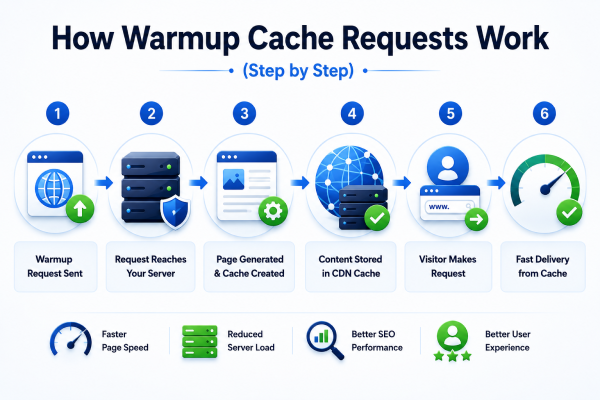
A warmup cache request follows nearly the same path a real visitor’s request would. The only real difference is timing, it fires automatically before anyone shows up, with the job of filling every relevant cache layer ahead of actual traffic.
Here’s how it plays out, step by step.
Step 1: The Warmup Process Starts
It kicks off when a warmup tool, deployment script, cron job, or CI/CD pipeline sends an HTTP GET request to whatever pages matter most.
Right after a deployment, for example, the system might automatically hit URLs like: Homepage About page Product pages Blog posts Category pages Landing pages API endpoints The server gets these requests immediately, no waiting around for a real person to show up first.
Step 2: The Request Reaches the CDN
From there, it heads to your Content Delivery Network (CDN).
Some of the more common ones out there: Cloudflare Amazon CloudFront Fastly Bunny CDN Akamai KeyCDN The CDN checks whether it’s already got that file sitting in its edge cache.
If the cache already exists It just gets served right away. No delay at all. If the cache is empty It gets forwarded on to the origin server instead. That’s what people call a cache miss.
Step 3: The Origin Server Generates the Page
With nothing cached, the origin server has to build the whole page from the ground up.
That usually means: Executing PHP or application code Reading data from the database Processing templates Generating HTML Loading API responses Optimizing images Compressing resources This is by far the heaviest part of the whole process.
Step 4: Cache-Control Headers Are Added
Before the response goes back out, the server attaches its caching instructions.
Common headers you’ll run into: Cache-Control ETag Last-Modified Expires Surrogate-Control Vary These basically tell every layer downstream: Whether the page is even allowed to be cached How long it should stick around When it should expire When it needs a refresh Get these headers wrong, or skip them, and even a great warmup strategy just falls apart.
Step 5: Every Cache Layer Stores the Response
Once the response comes back, each cache layer saves its own copy.
That might include: CDN cache Reverse proxy cache Application cache Object cache Database cache Browser cache From here on, the content just sits in memory instead of getting rebuilt every single time someone asks for it.
Step 6: Real Visitors Arrive
When someone actually requests that same page later, everything looks completely different.
No rebuilding from scratch this time: CDN → Cache Hit → Visitor. As a result, database queries are eliminated, expensive rendering is avoided, and backend processing is significantly reduced. The page loads almost instantly, providing visitors with a faster and more consistent browsing experience.
Understanding the Warmup Cache Request Flow
Here’s roughly what that cycle looks like laid out: Warmup Tool │ CDN / Edge Server │ (Cache Miss) Reverse Proxy │ Application Server │ Database │ Response Generated │ Caches Store Content │ Future Visitors Receive Cached Pages Once this cycle wraps up, everyone after that gets served straight from cache instead of forcing the server through all that work again.
Which Cache Layers Can Be Warmed by a Warmup Cache Request?
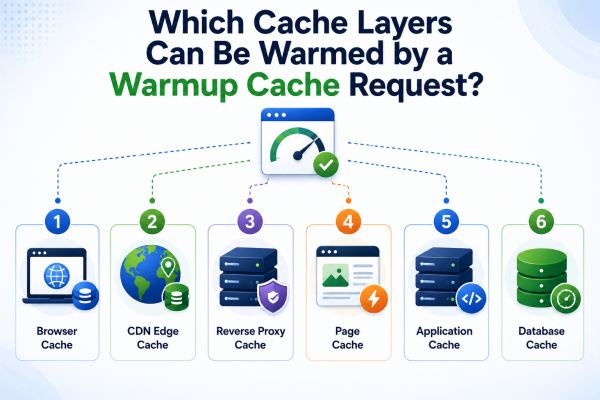
People tend to assume cache warming is only a CDN thing, but modern sites actually run through several layers, and each one does its own job.
1. CDN Cache
Usually the first layer users run into.
Holds things like: HTML pages CSS files JavaScript Images Fonts Videos PDFs Since content comes from nearby edge servers, visitors get much lower latency out of it.
2. Reverse Proxy Cache
Reverse proxies like: Nginx Varnish Apache Traffic Server store already-generated responses before they even reach the application.
Instead of rebuilding a page from zero each time, they just hand back what’s already there.
3. Application Cache
A lot of frameworks cache rendered pages, templates, or smaller fragments on their own.
A few examples: Laravel Cache Django Cache ASP.NET Output Cache Next.js Incremental Cache Warmup requests fill these before anyone actually shows up to use them.
4. Object Cache
Object caching holds onto data that gets reused a lot.
The usual names here: Redis Memcached Rather than hammering the database over and over, the app just grabs what it needs from memory instead.
5. Database Cache
Even databases keep their own internal caches.
Queries that run often end up much faster, since the results from before are still floating around in memory somewhere.
6. Browser Cache
This one’s really up to the visitor’s own browser, but warmup requests still matter here too, since they make sure the right headers are already set up for efficient storage on the client side.
Warmup Cache Requests in WordPress
WordPress sites in particular get a lot out of this.
Without it, whoever visits first after a cache clear forces WordPress to: Load PHP Query MySQL Execute plugins Build page templates Generate dynamic content Most of the popular caching plugins already handle automatic cache warming on their own.
Some examples: LiteSpeed Cache WP Rocket FlyingPress W3 Total Cache WP Fastest Cache These plugins go through the important pages automatically after a purge, so people get cached versions right away instead of catching the site mid-rebuild.
Cloudflare Cache Warmup
Cloudflare runs hundreds of edge locations worldwide, and each one keeps its own separate cache.
Which means warming up one data center doesn’t magically warm the rest of them too.
For a site with a global audience, it’s worth focusing warmup on: Homepage Landing pages Category pages Popular blog posts Product pages Critical static assets That way performance holds up no matter which region someone’s browsing from.
LiteSpeed Cache Warmup
LiteSpeed Cache comes with a built-in crawler that handles rebuilding on its own.
The crawler: Visits important pages Regenerates cached HTML Creates optimized image versions Refreshes expired cache Keeps frequently visited pages warm Which cuts down a lot on visitors ever hitting a cold-cache delay in the first place.
API Cache Warmup
Plenty of modern sites lean heavily on APIs these days.
Things like: Product search Pricing information Dashboards User feeds Mobile applications And it’s not just HTML pages getting warmed either. Many teams also warm up cacheable API endpoints, which takes pressure off the backend and speeds responses up across the board.
Why Multiple Cache Layers Matter
Every layer takes a bit of pressure off some other part of the stack.
For instance: CDN reduces internet latency. Reverse proxy reduces application processing. Object cache reduces database queries. Browser cache reduces repeated downloads. Stack them all together and you end up with a delivery pipeline where each piece is actually pulling its weight toward faster, more dependable performance.
Best Methods for Warmup Cache Requests
There’s no single right way to do this. What works depends on your traffic, your infrastructure, how often you deploy, and how frequently your content actually changes. A small blog might get away with a basic script, while a bigger platform usually needs something smarter, driven by real analytics.
Here’s what tends to work best in practice.
1. Manual Cache Warmup
About as simple as it gets, and honestly fine for smaller sites.
After clearing cache or pushing an update, you just go visit the important pages yourself: Homepage Service pages Product pages Popular blog posts Contact page Those visits generate fresh cached versions before anyone else shows up.
Best For
Personal blogs Portfolio websites Small business websites Low-traffic WordPress sites
Advantages
Easy to implement No additional software required Full control over warmed pages
Limitations
Time-consuming Easy to forget Doesn’t scale well
2. Script-Based Cache Warmup
Most developers just automate this with a script, and honestly, it’s the most common approach.
A deployment script fires off HTTP GET requests to the important URLs right after the new version goes live.
Typical flow: Deployment finishes. Cache clears automatically. Warmup script starts. Important URLs are requested. Cache fills automatically. Popular for good reason. Simple, reliable, easy to repeat every single time.
Best For
Medium websites Company websites WordPress agencies SaaS platforms
3. Scheduled Cache Warmup
Some sites just refresh their cache on a set schedule, every few hours, say.
A scheduler, cron job, Task Scheduler, whatever your CI/CD setup uses, rebuilds the cache before it has a chance to expire on its own.
That gets you: Fresh cached content Consistent performance Reduced cold-cache periods Lower server spikes
4. Intelligent Cache Warmup
Bigger sites tend to skip fixed URL lists entirely and lean on analytics instead.
The system figures out on its own which pages actually matter: Most visited pages Highest converting pages Trending products Popular blog posts Frequently requested APIs Only those get priority treatment, which cuts down on wasted effort while pushing cache efficiency higher.
5. Predictive Cache Warming
AI is starting to shift how all of this works, honestly.
Instead of just warming yesterday’s popular pages, AI tries to guess what visitors are about to want next.
That guess might factor in: Historical traffic Seasonal demand User behavior Marketing campaigns Geographic trends Search popularity It cuts down on wasted resources while pushing cache hit ratios even further up.
Real-World Examples of Warmup Cache Requests
Example 1: WordPress Blog
Say a blog publishes a new post every single morning.
Without cache warming: First visitor experiences slow loading. PHP generates the page. Database queries increase. With warmup cache requests: Article is cached immediately. Readers receive fast responses. Search engine crawlers also benefit.
Example 2: eCommerce Store
An online store kicks off a Black Friday sale.
Traffic jumps from a couple hundred visitors to thousands, almost overnight.
Without cache warming: Database overload Slow checkout High CPU usage Increased bounce rate With warmup cache requests: Product pages are already cached. CDN serves most visitors. Origin server handles far fewer requests. Shopping experience remains smooth.
Example 3: SaaS Dashboard
A SaaS company ships a new release every week, like clockwork.
Instead of letting customers slowly build the cache on their own, deployment automatically warms: Dashboard Reports Login page API endpoints Analytics pages Customers basically never notice a slow first load after an update.
Common Mistakes to Avoid With Warmup Cache Requests

A handful of mistakes show up again and again with cache warming.
Warming Every URL
Not every page is worth warming, not even close.
Focus on: High-traffic pages Landing pages Revenue-generating pages Frequently visited APIs
Ignoring Cache Headers
Skip proper headers like Cache-Control or ETag, and whatever you just warmed might never actually get stored correctly.
Always double-check your caching policy before running a warmup job.
Sending Too Many Requests
Firing off thousands of requests all at once can end up overloading your own server, which kind of defeats the whole point.
Better to lean on: Rate limiting Delays Request batching to protect your backend from taking damage it doesn’t need.
Caching Personalized Pages
Never warm: User dashboards Shopping carts Checkout pages Private account pages These need to stay specific to each user. They shouldn’t end up sitting in a shared cache, ever.
Forgetting Cache Expiration
Every cached resource eventually runs out its clock, no exceptions.
Line your warmup jobs up with your TTL (Time To Live) settings so performance stays consistently fast.
Performance Metrics You Should Monitor
None of this matters unless you can actually see it working.
Cache Hit Ratio
Shows how many requests get served straight from cache instead of hitting the origin. Higher usually means things are running efficiently.
Time To First Byte (TTFB)
Measures how fast the server starts sending data back. A good warmup strategy usually brings this number down quite a bit.
Largest Contentful Paint (LCP)
Shows how quickly the main content on a page becomes visible. Lower numbers mean a better experience and steadier Core Web Vitals.
Origin Server Load
Keep an eye on: CPU usage Memory consumption Database activity Network bandwidth Good cache warming takes a real bite out of backend load, especially during peak traffic.
Error Rate
Make sure the pages you’re warming are actually returning successful responses, not cached errors sitting there unnoticed.
Regular monitoring catches configuration problems before they turn into something bigger.
Security Best Practices for Cache Warmup Requests
Automating cache warmup shouldn’t come at the expense of security. That’s a trade nobody should make.
Worth following: Authenticate automated warmup tools. Restrict access using IP allowlists when possible. Apply rate limits to prevent abuse. Monitor unusual traffic patterns. Keep cache-control policies updated. Exclude sensitive user-specific pages from shared caches. Regularly audit automation scripts. Get this right and warmup requests improve performance without opening up new risks along the way.
Future of Warmup Cache Requests
Website optimization keeps evolving, and warmup cache request technology is evolving with it. As websites become more dynamic and user expectations continue to grow, traditional cache warming methods are being replaced by smarter, automated solutions.
Future developments are expected to rely heavily on:
- Artificial Intelligence (AI)
- Machine Learning (ML)
- Predictive Analytics
- Edge Computing
- Smart CDN Optimization
- Real-Time Traffic Analysis
Instead of relying on static URL lists, future warmup cache request systems will automatically predict which pages users are most likely to visit. They will preload high-demand content before traffic arrives, reducing latency and improving overall website performance.
AI-powered warmup cache request tools may also analyze visitor behavior, seasonal traffic patterns, and trending content to decide when and what to cache. This will minimize server workload, improve Core Web Vitals, and deliver a faster browsing experience across desktop and mobile devices.
As CDN providers and caching platforms continue to innovate, automated warmup cache request strategies are expected to become a standard feature for modern websites. Businesses that adopt these intelligent caching techniques early will be better prepared for higher traffic, improved scalability, and stronger SEO performance in the years ahead.
Frequently Asked Questions About Warmup Cache Requests
What is a warmup cache request?
It’s an automated HTTP request that preloads important resources into cache ahead of real visitors, cutting load times and easing the strain on your server.
Does cache warming improve SEO?
Indirectly, yes. Faster loading, lower TTFB, steadier Core Web Vitals, and a smoother overall experience all feed into stronger search performance over time.
Is cache warming necessary for small websites?
Not always, honestly. A small site with light traffic can usually get by fine without advanced cache warming, though sites that update often or are growing will still see real benefit from it.
Can APIs be warmed?
Yes. Frequently used API endpoints can be cached and warmed too, which takes load off the backend and speeds up responses.
How often should cache warming run?
Usually after: New deployments Cache purges Server restarts Major content updates Before expected traffic spikes
Which websites benefit the most?
Cache warming tends to help most with: eCommerce stores SaaS applications News websites Large blogs Enterprise platforms High-traffic WordPress sites API-driven applications
Final Thoughts
A warmup cache request is more than a simple performance optimization. It prepares your website for visitors before they arrive, reducing server load and improving page speed. Whether you’re running a WordPress blog, an eCommerce store, or a SaaS platform, this strategy helps deliver consistent performance and stronger Core Web Vitals. By combining cache warming with a CDN, optimized images, proper cache headers, and regular monitoring, you can build a faster and more reliable website. Ultimately, every visitor benefits from quicker loading times, a smoother browsing experience, and better overall website performance.
Instead of waiting for visitors to build your cache the slow way, take a proactive approach with a warmup cache request. A warm cache ensures faster loading times, greater stability, and a better user experience from the very first visit. Moreover, it reduces server load by serving preloaded content instead of generating pages on demand. As a result, your website can maintain consistent performance even after deployments, cache purges, or traffic spikes. Ultimately, as website performance becomes increasingly important for SEO and customer satisfaction, cache warming remains one of the simplest yet most effective optimization strategies for modern websites. Therefore, implementing a warmup cache request is a smart long-term investment for improving speed, scalability, and overall website reliability.
Share this content:














Post Comment